Contact Form

Name

Email *

Message *

Backup Your Business with Zoolz


The Zoolz intuitively designed cloud storage service is both targeted to home and business users. You can easily determine that Zoolz is quite different from other online backup services. It offers interesting features which are clearly targeted towards business users, but the pricing is quite fair and even personal users can afford the Zoolz' professional services.

Zoolz has an interesting flexible pricing model, which is a system, in which you pay for what you use. You can upgrade and downgrade your storage capacities depending on your current needs. The service offers two kinds of storage: Instant Storage and Cold Storage. The minimum that you get is 50GB Instant Storage and 1 user.


In terms of security, Zoolz offers robust data protection and encryption, which is trusted by large organizations all over the world. They claim that their protection covers and even surpasses any legal requirements.

One of the features Zoolz provides its business users is continuous backup – the system monitors the changes you make on your files and backups your data at the moment you update them. There is no limit to what you backups – you can backup your embedded drives, as well as external drives and your multiple computers. The backup modes that the system provides are: turbo, smart, battery saving and presentation.


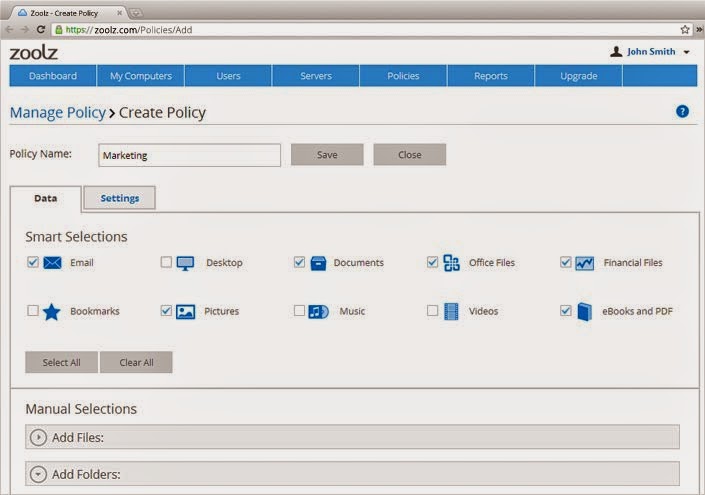
The difference between these modes is the amount of system resources it uses. The system does not impose any limit to the file size. You can configure the types of files you want to backup and those you don't want to. Those users, who hold the administration rights can specify the users who are allowed to backup files, and the types of files they can backup. Admins can also configure users' rights and privileges on the online storage platform. They can also set storage limits to various users.

For now the Zoolz data backup system offers mobile applications for Android and iOS devices, but not for Windows Phone or Blackberry.

With Zoolz file sharing and link generation is very easy. You can add additional protection to the files you share using a password. Also, you can set expiration time for your links.

Zoolz provides specialized software, through which you can copy and encrypt your data on an external drive and ship it to Zools for processing your files onto the cloud. This is especially helpful for companies which possess a lot of sensitive data.

Probably the most interesting service offered by Zoolz is the so called Cold Storage. Shortly, this is used for backing up files that are rarely used and don't need frequent updating. It is intended for archiving purposes and its price is lower than the one for Instant Storage.

Also, Zoolz can boast for its powerful search engine. Using it, you can easily search and locate your files among the multiple files you are storing. When performing backup, if you are doing this for multiple computers using one user, you can easily switch between your various computers, without bothering about any data loss.
The registration process for the service is very easy. You simply need to enter your name, email address and password and you are good to go. You are offered a 14-day test trial during which you can familiarize yourself with the file storage platform.


Upon sign up you are offered to download the desktop application. When installed, you get the following start screen where you can select multiple features.


At this point you can select the locations through which data backup will be performed, as well as the type of files that will be backed up. You can also select Cold storage or Instant storage for your digital belongings. For your free trial you get 14 days for testing, 1 user and 50GB free instant storage space.

Generally, the basic upload and backup of your files is performed through the desktop application. Once uploaded, your files are safe on the online storage platform. Through it, you can easily share your stuff with other users and enter restrictions for your files and folders.


As a conclusion, Zoolz is so abundant it terms of services, that it may take a lot of time to read about them. And since we don't want this article to take you a day to read, we advice you to simply take a look and enjoy the service yourselves.

Your business in Box


Box is one of the fastest developing cloud services and we've got to say - they are doing great. Box.com have the best business plans for a small or large business.
Although at first look the admin panel looks complicated and filled with unusual stuff, if you take a better look and spare time to get familiar with the platform you'll find out that everything is exactly where it should be.
With Box business you won't need anything else in order to organize your staff and files.
By adding new participants you can set their acces type in 7 different levels :
- co owner
- editor
- viewer uploader
- preview downloader
- viewer
- previewer
- uploader


Sharing of files and folders happens easy and intuitive. You can send an email to all of your team members at once, or you can write an inside the platform message.
Also, every file and folder can be commented and mentions of team member can be included. You can assign a file to member and ad a due date. Later the user can mark it as a complete or reassign it to someone else.
The version history that Box keeps is 50, also there is a maximum file size of 5GB.
The admin can view a detailed stats on user activity.


With Box Business you can create a Office and Google documents with the help of additional app called Box Edit that will open Microsoft Office or Google documents on you PC and save then straight to you account.
If you work on a file it will be locked for the other participants and when you close it you can check out the past versions.


Box Business is a great solution if you are looking for a complex cloud to serve your needs. Content collaboration and user management at it's finest.

The Box Business plan cost is $15 a month with a minimum of 3 users.
The full list of available features:

Desktop Sync
Mobile Access
OneCloud Apps
SSL and At Rest Encryption
Two-Factor Authentication
Secure Sharing
Office Integration
Edit Documents
Rich File Preview
Search
Access Permissions
Auto-Expiration
File Locking
Access Stats
Version History
Content Security and Management
User Management
Audit Logs

Cloud storage for Business - Where to start

Businesses of all kinds are storing important content and data. Till recently most of the business preferred to keep their information on local servers. But in time that has proven to be rather dangerous, having in mind that servers can be damaged or lost to natural disasters, theft or computer crashes. 
Cloud storage services are actually a much better decision for storing or backing up all of the important data. Although many people believe that the cloud is not a good option due to reliability and security concerns, most of the cloud storage providers have been working hard to make their service suitable for all the need of the both personal and business users. 
The hesitation many business owners once has about trusting their digital information to an outside entity for storage is vanishing. Entrusting your business' files to cloud storage is quite stress free, taking the fact that the "anytime, anywhere" factor occurs. This is particularly helpful for small business that are not based in an office. All employees have access to the work-related files and the account manager can observe when and what changes are made. 
For big and evolving businesses the same rule applies. Project managers are capable to work even if they are on vacation or at an important meeting out of town.
Most cloud storage services for business have all the needed tools to entrust business data to them - like mobile and desktop apps, web access, version history, file recovery, prevent sharing outside of the team, security and team management. Some of them even have office integration and option to edit document online. 

What to look for when choosing cloud storage for your business? 
  • Storage capacity - Most of online cloud storage providers offer different business plans according to the number of team members. There is a huge difference if you are looking for a cloud storage for 5-10 employees and more than a 100. It's best if you plan ahead.
  • Features - Think very carefully what features your business is going to need from the cloud service. Things like version history, back up and team management can play a huge role in your development. 
  • Security - Private information about clients always should be handled with cation. The best business cloud services encrypt your information and some even do it twice.
  • Collaboration - Managers, employees and even clients may need a remote access to the information stored in a cloud. It's best if you choose a cloud provider with secure mobile access, sync options and branding tools. 
  • Help and support - You may think you have it all under control, but never underestimate the possibility of something going wrong. Especially when a lot of people have access to one account. The best cloud services will always offer support, ready to assist you by phone, email or live chat. 
Business cloud storage is a must have for any company that cannot afford to lose data in any way. So, in other words - a must have for every business.
Here at Cloud and Business our mission is to help you find the best cloud storage for your company. So stay tuned and we'll teach you how to use the cloud for you business at it's fullest.